
Delve into the world of Acumatica ERP, a robust solution designed to revolutionize business operations. From its core functionalities to seamless integration with other software systems, this guide provides a deep dive into what makes Acumatica ERP a game-changer for businesses across industries.
Overview of Acumatica ERP
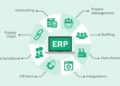
Acumatica ERP is a cloud-based enterprise resource planning software that helps businesses streamline their operations by integrating various functions like accounting, finance, inventory management, and customer relationship management. It provides real-time data access, automation of processes, and customizable dashboards for better decision-making.
Core Functionalities of Acumatica ERP
- Financial Management: Acumatica enables businesses to manage their finances effectively with features like general ledger, accounts payable/receivable, budgeting, and cash management.
- Inventory Management: The software helps in optimizing inventory levels, tracking goods movement, and managing supply chain processes efficiently.
- CRM: Acumatica offers tools for managing customer relationships, tracking leads, and improving sales and marketing efforts.
- Project Accounting: Businesses can control project costs, track resources, and monitor project performance in real-time.
- Reporting and Analytics: Acumatica provides robust reporting capabilities and customizable dashboards for data visualization.
Benefits of Using Acumatica ERP for Businesses
- Scalability: Acumatica can grow with your business, accommodating increased data and user requirements as your company expands.
- Cost-Effective: The cloud-based nature of Acumatica eliminates the need for expensive hardware and maintenance costs, making it a cost-effective solution for businesses.
- Flexibility: With customizable modules and workflows, Acumatica can be tailored to meet the specific needs of different industries and businesses.
Examples of Industries Using Acumatica ERP
- Manufacturing: Acumatica helps manufacturers manage production processes, inventory, and supply chain operations efficiently.
- Retail: Retail businesses benefit from Acumatica’s inventory management, CRM, and financial tools to enhance customer service and streamline operations.
- Professional Services: Companies in the professional services sector use Acumatica for project management, resource allocation, and financial tracking.
Key Features of Acumatica ERP
Acumatica ERP offers a range of key features that cater to the diverse needs of businesses, providing flexibility and scalability to adapt to changing requirements.
Main Modules and Features
- Financial Management: Acumatica ERP includes modules for general ledger, accounts payable/receivable, cash management, and more, streamlining financial processes.
- Customer Relationship Management (CRM): Manage customer interactions, sales opportunities, and marketing campaigns effectively within the CRM module.
- Project Accounting: Keep projects on track with modules for budgeting, time tracking, expense management, and billing.
- Inventory Management: Optimize inventory levels, track stock movements, and automate replenishment processes with Acumatica’s inventory management module.
Customization Options
Acumatica ERP offers extensive customization options to tailor the system to specific business requirements. Users can customize dashboards, reports, workflows, and data fields without the need for coding, ensuring a personalized user experience.
Integration with Other Software Systems
Acumatica ERP supports seamless integration with a wide range of third-party software systems through APIs and connectors. This enables businesses to connect Acumatica with CRM systems, e-commerce platforms, payroll software, and more, facilitating data exchange and improving operational efficiency.
Implementation and Deployment of Acumatica ERP
Implementing and deploying Acumatica ERP for a new client is a crucial process that requires careful planning and execution. By following best practices and considering the available deployment options, businesses can effectively leverage the power of Acumatica ERP to streamline their operations and drive growth.
Steps for Implementing Acumatica ERP
When implementing Acumatica ERP for a new client, the following steps are typically involved:
- Assessing business needs and processes to determine the requirements for the ERP system.
- Customizing Acumatica ERP to align with the specific needs of the client’s business.
- Training key users and employees on how to effectively use the system.
- Testing the system to ensure it functions properly and meets the desired goals.
- Deploying the system across the organization and providing ongoing support.
Best Practices for Deploying Acumatica ERP
To ensure a successful deployment of Acumatica ERP, businesses should consider the following best practices:
- Engage key stakeholders throughout the implementation process to ensure alignment with business goals.
- Provide comprehensive training to users to maximize system adoption and efficiency.
- Regularly review and optimize processes to leverage the full potential of Acumatica ERP.
- Collaborate with experienced Acumatica partners or consultants for expert guidance and support.
Comparison of Deployment Options for Acumatica ERP
Acumatica ERP offers different deployment options to cater to the diverse needs of businesses. These options include:
- Cloud Deployment: Ideal for businesses looking for flexibility, scalability, and cost-effectiveness.
- On-Premises Deployment: Suitable for organizations that require complete control over their ERP environment.
- Hybrid Deployment: Combines the benefits of cloud and on-premises deployment for a customized solution.
User Experience and Interface of Acumatica ERP
Acumatica ERP offers a user-friendly interface that enhances user experience and allows for efficient navigation and utilization of the software.
User Interface of Acumatica ERP
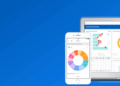
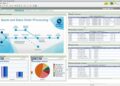
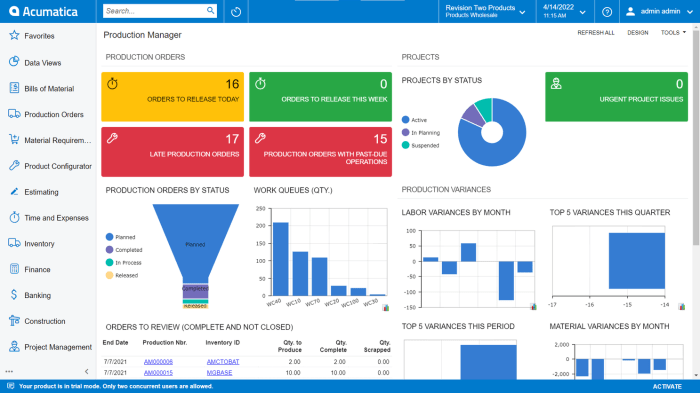
The user interface of Acumatica ERP is clean, intuitive, and customizable, providing users with a personalized experience. Users can easily access different modules, features, and functionalities through a centralized dashboard.
- Users can customize their dashboard to display key performance indicators (KPIs), reports, and other relevant information based on their specific roles and responsibilities.
- The interface is designed to be responsive, allowing users to access Acumatica ERP from various devices, including desktop computers, laptops, tablets, and smartphones.
- Navigating through different modules and screens is seamless, thanks to the well-organized menu structure and search functionality.
Examples of Dashboards or Reports in Acumatica ERP
Acumatica ERP offers a variety of pre-built dashboards and reports that provide users with real-time insights into their business operations.
- The Financial Overview dashboard displays key financial metrics such as revenue, expenses, and cash flow, allowing users to track their financial performance at a glance.
- The Sales Performance report provides detailed information on sales orders, quotes, and opportunities, helping sales teams monitor their performance and identify areas for improvement.
- The Inventory Status dashboard offers visibility into inventory levels, reorder points, and stock movements, enabling users to optimize their inventory management processes.
Customization in Acumatica ERP
Customization plays a crucial role in enhancing the user experience in Acumatica ERP, allowing users to tailor the software to meet their specific needs and preferences.
- Users can customize dashboards, reports, and data entry screens to display only relevant information and fields, improving productivity and usability.
- Acumatica ERP supports the creation of custom workflows, alerts, and notifications to automate repetitive tasks and streamline business processes.
- With the ability to integrate third-party applications and tools, users can further enhance the functionality of Acumatica ERP and create a seamless workflow across different platforms.
Security and Compliance in Acumatica ERP
In today’s digital landscape, data security and compliance with industry regulations are paramount for businesses utilizing ERP systems like Acumatica. Let’s explore how Acumatica ERP ensures the protection of sensitive data and compliance with industry standards.
Security Features in Acumatica ERP
- Role-based security: Acumatica allows administrators to define access levels based on roles, ensuring that users only have access to the data and functionality necessary for their job.
- Encryption: Data in Acumatica ERP is encrypted both at rest and in transit, providing an extra layer of security to protect sensitive information.
- Audit trails: Acumatica logs all user activities, allowing administrators to track changes and access to data, enhancing accountability and security.
- Two-factor authentication: Acumatica supports two-factor authentication, adding an extra layer of security to verify user identities and prevent unauthorized access.
Compliance with Industry Regulations
- GDPR compliance: Acumatica helps businesses comply with the General Data Protection Regulation (GDPR) by providing tools to manage and safeguard personal data in accordance with the regulation.
- SOX compliance: Acumatica assists businesses in complying with the Sarbanes-Oxley Act (SOX) by enabling financial controls and audit trails to ensure data accuracy and integrity.
- HIPAA compliance: For healthcare organizations, Acumatica offers features to support compliance with the Health Insurance Portability and Accountability Act (HIPAA) by safeguarding protected health information.
Best Practices for Data Security in Acumatica ERP
- Regularly update and patch the system to address security vulnerabilities.
- Implement strong password policies and encourage users to use complex passwords.
- Train employees on data security best practices and the importance of safeguarding sensitive information.
- Monitor user access and activity to detect any unauthorized actions or security breaches.
Ultimate Conclusion
Embark on your Acumatica ERP journey armed with valuable insights and knowledge. This guide has equipped you with the necessary information to navigate the realm of Acumatica ERP effectively, empowering you to optimize your business processes and drive growth.
Key Questions Answered
What industries commonly use Acumatica ERP?
Acumatica ERP is frequently used in industries such as manufacturing, distribution, retail, and professional services.
How does Acumatica ERP ensure compliance with industry regulations?
Acumatica ERP incorporates robust security features and undergoes regular updates to align with industry standards and regulations, ensuring data compliance.
What customization options are available within Acumatica ERP?
Users can tailor Acumatica ERP to their specific needs by customizing workflows, reports, and dashboards to enhance efficiency and usability.
What are the best practices for deploying Acumatica ERP effectively?
Effective deployment of Acumatica ERP involves thorough planning, training for users, and close collaboration between the implementation team and stakeholders.